Do you have these concerns?
If you're struggling with expense management, Rakukei will solve it
Receipt entry takes hours every month
At the end of the month, you have to manually enter each receipt one by one. Are you spending several hours each month on expense entry?
Store names and accounts vary by person
Different notations like "Sagawa Express", "Sagawa Express (Corp.)", "Sagawa Express Co., Ltd." make aggregation difficult.
Take photos of receipts while out, but forget later
You forget to enter the receipt images saved on your phone into your PC later.
Monthly aggregation and month-over-month comparison are tedious
Manually aggregating in Excel and comparing with the previous month takes time. You also have to create graphs yourself.
Organizing before importing into accounting software is difficult
The work of organizing and formatting data before importing into accounting software is time-consuming.
Lose receipts
Even if you keep paper receipts, you don't know where you put them. This causes problems during tax audits.
👉 All of that work can be automated.
Just send receipts via LINE. AI automatically analyzes, records, and aggregates everything.
Start Free NowWhy Choose "Rakukei"
4 strengths that complete expense management in just 5 seconds
1. Capture and Send via LINE
Even when you're out, just take a photo of the receipt and send it via LINE. You can send multiple receipts at once.
- ✓ Just take a photo with your phone, simple operation
- ✓ Can send multiple receipts at once
- ✓ Register instantly even when you're out
2. AI Automatic Analysis
With the latest AI OCR technology, automatically extracts necessary information from receipts. No manual entry required.
- ✓ Automatically distinguishes receipts/bank transfer statements
- ✓ Automatically extracts date, amount, vendor, and account
- ✓ Automatically unifies store name variations (e.g., Sagawa Express/Sagawa Express (Corp.))
3. Automatic Bookkeeping & Dashboard Generation
Monthly aggregation and graph display are also automated. You can see the data needed for business decisions at a glance.
- ✓ Automatic monthly sheet creation
- ✓ Visualization with pie charts by account
- ✓ Month-over-month comparison and annual trend graphs
4. Getting Smarter with Learning Function
Accuracy improves the more you use it. It learns from your corrections and automatically classifies correctly from the next time.
- ✓ Automatically learns corrected accounts
- ✓ Automatically suggests correct accounts from next time
- ✓ Accuracy improves the more you use it
Features of Rakukei Seen in Actual Screens
With intuitive operation, expense management becomes this simple
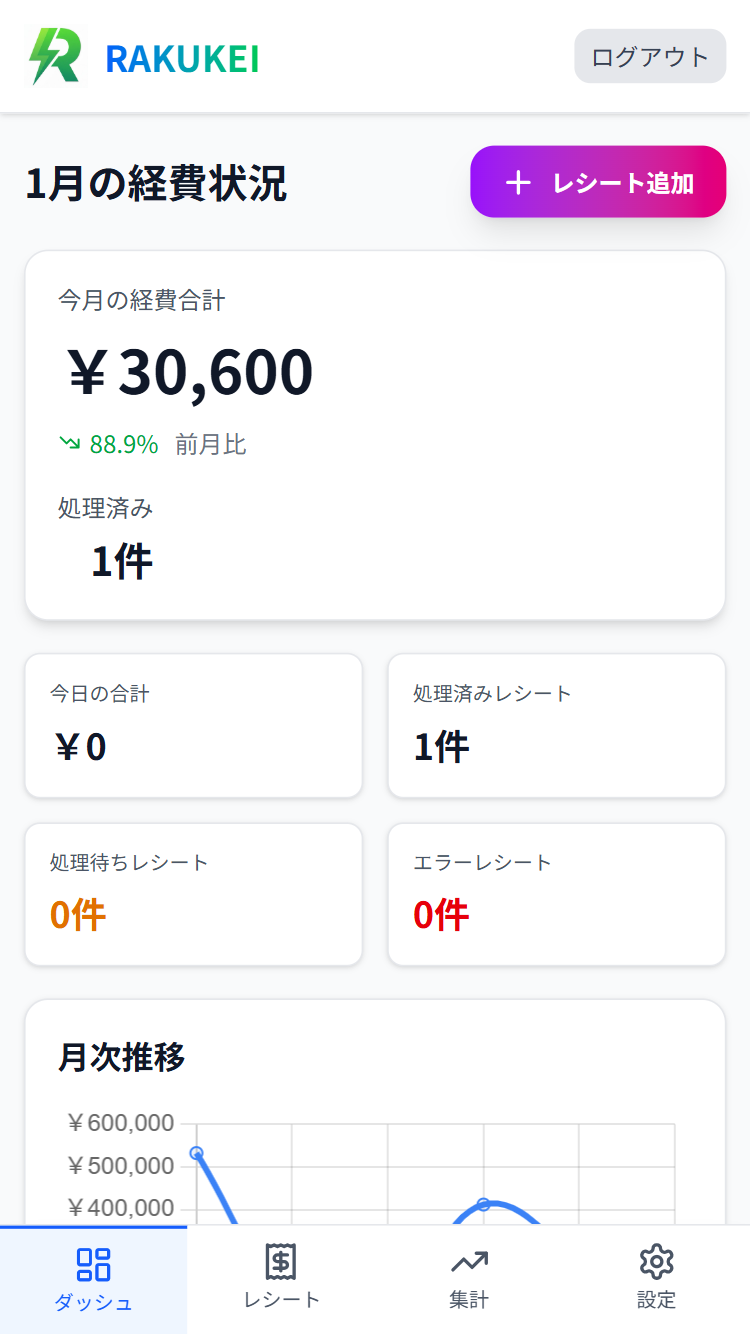
Complete Expense Overview at a Glance
- ✓ Visualize monthly and annual expense trends with graphs
- ✓ Expense breakdown is clear at a glance with pie charts by account
- ✓ Instantly grasp expense increases/decreases with month-over-month comparison
- ✓ Quickly confirm information needed for business decisions with intuitive UI
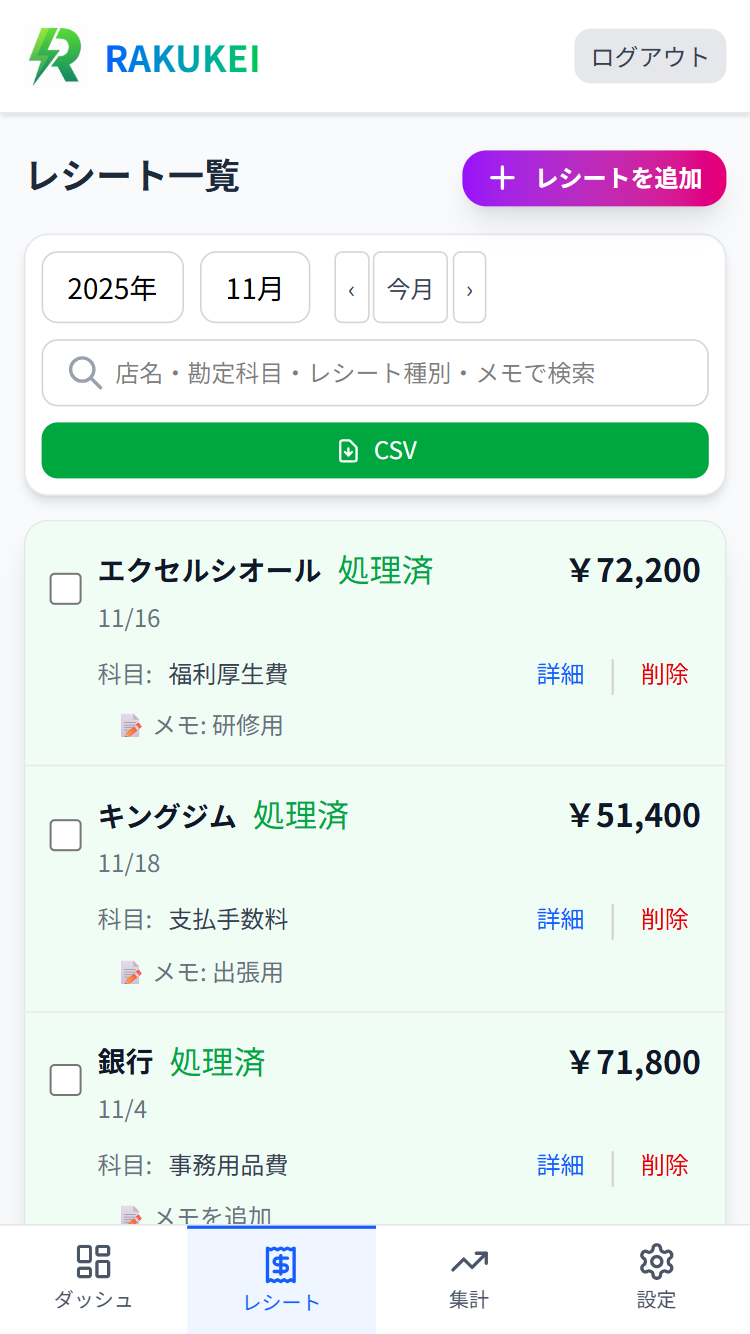
Expense Data Automatically Extracted by AI
- ✓ List view of date, amount, and vendor automatically extracted from receipts
- ✓ Can confirm and correct accounts automatically determined by AI
- ✓ Automatically unifies store name variations (e.g., Sagawa Express / Sagawa Express (Corp.))
- ✓ Receipt images are also automatically saved and can be checked later
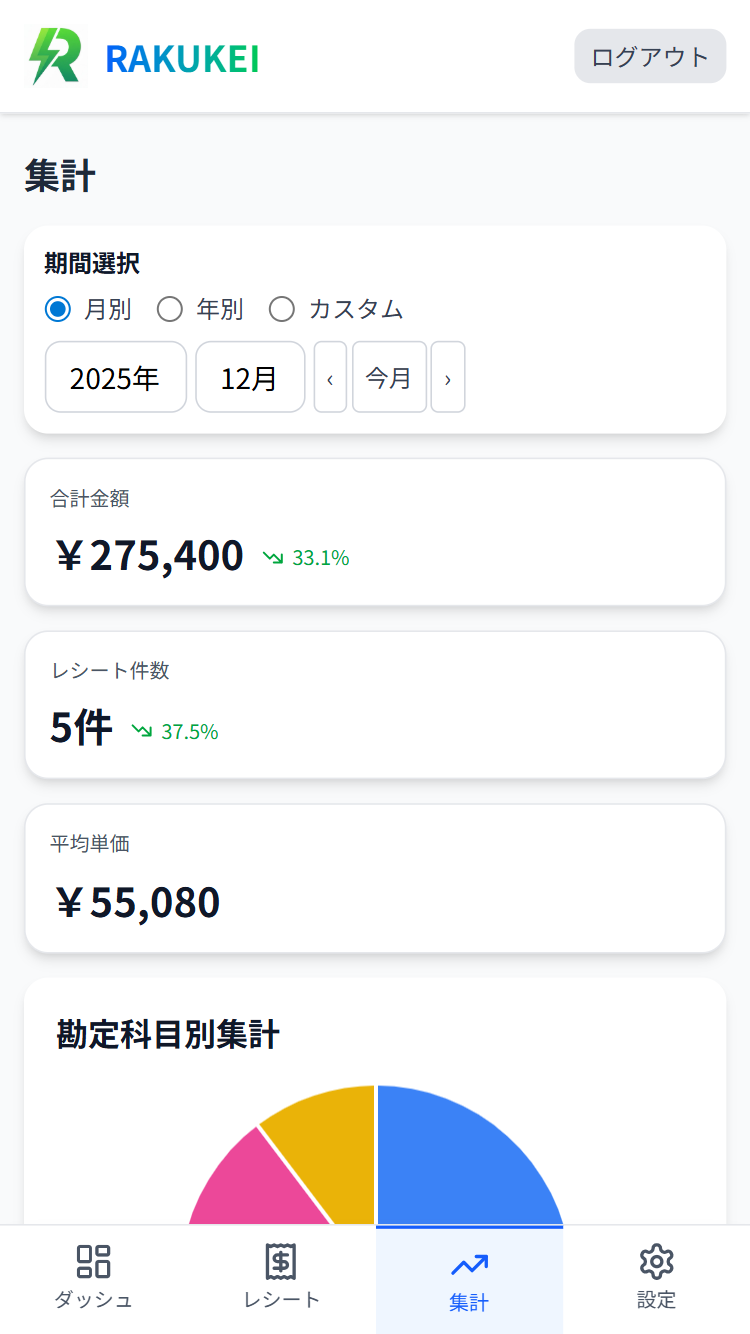
Streamline Accounting Work with Automatic Aggregation
- ✓ Reduce manual work with automatic monthly and annual aggregation
- ✓ Automatically calculates detailed breakdown by account
- ✓ Analyze expense trends with month-over-month comparison and annual trends
- ✓ Preparation for accounting software integration is also completed automatically
Easy Receipt Registration Even When Out
- ✓ Just send receipt images via LINE for automatic registration
- ✓ Can send multiple receipts at once
- ✓ Record expenses immediately even when out
- ✓ No worry about losing receipts
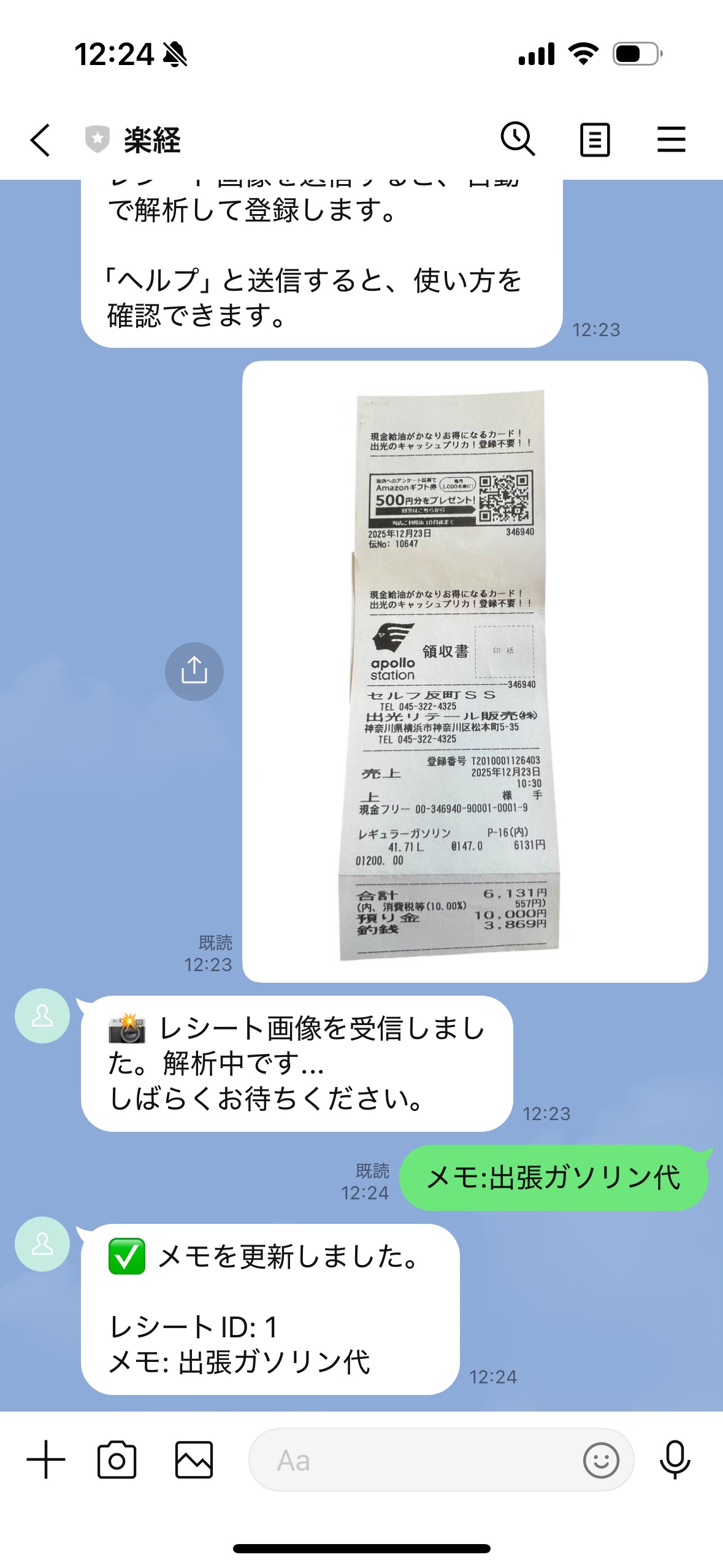

AI Automatically Analyzes and Registers
- ✓ AI automatically analyzes sent receipts
- ✓ Automatically extracts date, amount, and vendor
- ✓ Accounts are also automatically classified
- ✓ Analysis results can be confirmed on LINE
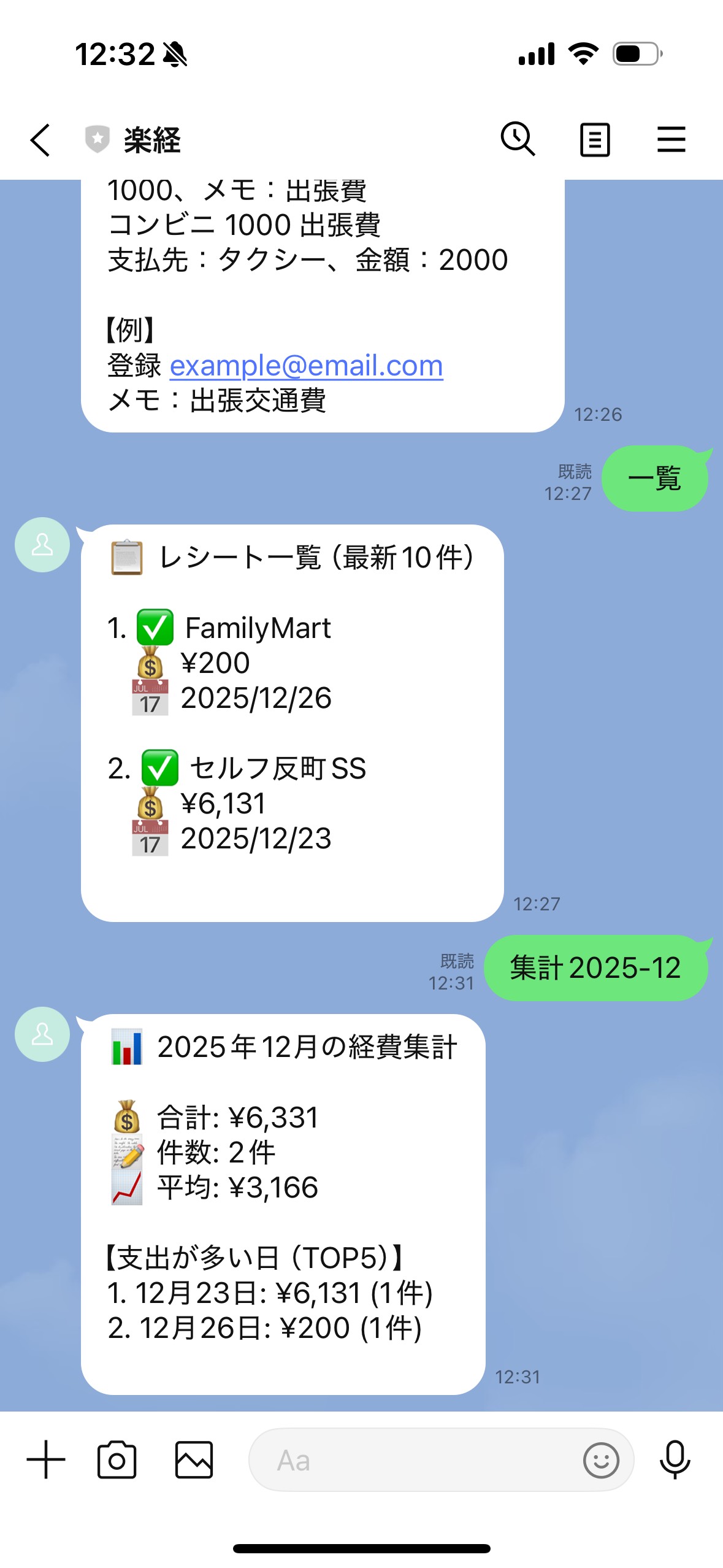
Confirm and Aggregate Expenses from LINE
- ✓ Check this month's expense list from LINE
- ✓ Instantly check monthly aggregation on LINE
- ✓ Grasp expense status even when out
- ✓ Operable with simple commands
Recommended For
Sole Proprietors & Freelancers
Small Businesses & Startups
Store Owners
Those Who Want to Streamline Without Outsourcing Accounting
Simple 3-Step Usage
Expense management completes in just 5 seconds
Capture
Just take a photo of the receipt with your smartphone. You can take multiple receipts at once.
Send
Just send the image via LINE. You can register instantly even when you're out.
Complete
AI automatically analyzes and records. Saved to the sheet, and aggregation is also completed automatically.
That's all it takes to complete expense management!
Work that took hours per month is now just 5 seconds
Differences from Other Tools
See why Rakukei is chosen through comparison
| Comparison Item | General Expense Management Tools | Rakukei |
|---|---|---|
| Receipt Registration Method | Manual Entry・Excel Entry | LINE Send Only (5 seconds) |
| Registration from Outside | Not Possible (PC Required) | Possible (Instantly from LINE) |
| AI Automatic Analysis | None・Limited | Automatically extracts date, amount, vendor, and account |
| Store Name Variation Unification | Manual Correction Required | Automatic Unification (e.g., Sagawa Express/Sagawa Express (Corp.)) |
| Monthly・Annual Aggregation | Manual Aggregation | Automatic Aggregation・Month-over-Month Comparison・Graph Display |
| Learning Function | None | Yes (Learns from corrected accounts) |
| Receipt Image Storage | Separate Management Required | Automatic Storage・Can Check Later |
| Initial Cost | Often High Cost | Free Plan Available (From ¥0) |
| Setup | Complex・Time-Consuming | Simple (LINE Integration Only) |
Pricing Plans
Please choose the plan that best suits you
Free Plan
¥0
"First, proper automation"
- ✓ Receipt Processing: Automatic bookkeeping up to 100 receipts/month
- ✓ Automatic bookkeeping function
- ✓ Receipt image upload
- ✓ Send from LINE (Send receipts via LINE integration)
- ✓ Can experience expense management
- ✗ Learning rules function (Bookkeeping gets easier and easier)
- ✗ CSV export function (Data export)
Standard Plan
¥900/月
"Organized correctly without thinking"
- ✓ Receipt Processing: 1000 receipts/month (10x the free plan)
- ✓ Automatic bookkeeping function
- ✓ Receipt image upload
- ✓ Send from LINE (Send receipts via LINE integration)
- ✓ Learning rules function (Bookkeeping gets easier and easier)
- ✓ CSV export function (Data export)
- ✗ Multiple user management (Team use)
Valid for 1 month after payment completion
Business Plan
¥1,800/月
"Expense management for teams"
- ✓ Receipt Processing: Unlimited
- ✓ Automatic bookkeeping function
- ✓ Receipt image upload
- ✓ Send from LINE (Send receipts via LINE integration)
- ✓ Learning rules function (Bookkeeping gets easier and easier)
- ✓ CSV export function (Data export)
- ✓ Multiple user management (Team use)
- ✓ Multi-store/branch support
- ✓ Accounting software integration (freee・Money Forward)
- ✓ Priority support (Business doesn't stop)
よくあるご質問
Rakukeiに関するよくあるご質問にお答えします
Q. How accurate is the reading? ▼
We use the latest AI OCR technology and can read with high accuracy even handwritten receipts or images taken at a slight angle.
※ Confirmation and correction can also be done easily on the sheet. With the learning function, accuracy improves the more you use it.
Q. Is security safe? ▼
Since it directly integrates with your own Google account, we do not store data long-term on our servers.
All data is encrypted and stored, so you can use it with peace of mind.
Q. Can it integrate with accounting software? ▼
Easy integration via spreadsheets. With the CSV export function (Standard Plan and above), importing into accounting software is also easy.
Since monthly aggregation data is also automatically organized, you can significantly reduce the work of entering data into accounting software.
Q. Can multiple people use it? ▼
グループLINE対応で、店舗・チーム利用OKです。Business Planでは複数ユーザー管理機能も利用できます。
When multiple people use the same account, each member just sends receipts from LINE, and they are automatically integrated and managed.
Q. Can I use it with the free plan? ▼
Yes, you can use all basic functions with the free plan. You can process up to 100 receipts per month.
First, try the free plan, and you can upgrade to Standard Plan (¥900/month) or Business Plan (¥1,800/month) as needed.
Q. Is LINE integration setup difficult? ▼
Very easy. Just link your LINE account from the settings screen and send "Register [email address]" to the LINE Bot.
After integration is complete, just send receipt images via LINE and they will be automatically registered. Easy to use even when you're out.
If you have any other questions, please feel free to contact us.
Start Freeお問い合わせ
If you have any questions or concerns, please feel free to contact us
Contact Methods
Contact via LINE
You can also contact us via LINE Bot.
Please search for "Rakukei" in the LINE app and add as a friend.
Support Hours
Weekdays 10:00 - 18:00
We are closed on weekends and holidays
Contact Form
Please also check the frequently asked questions
View FAQ →